This is a Simple Step-By-Step of how install Trend Micro Workload Security Automatically in AWS Elastic Beanstalk Environment, using Elastic-Beanstalk extensions to Run de Deployment Script.
-
This guide may Works in Cloud One Workload Security or Deep Security as a Service, - For On-premise Environment we need to consider other things that for moment aren't include in this article.
- Cloud One Workload Security active console (Deep Security as a Service works too)
- AWS Bucket S3
- AWS Elastic Beanstalk Application You can use this examples app for Testing
- AWS ElasticBeanstalk CLI (Optional) - EB Cli Installation
-
Login in Cloud One Workload Security/Deep Security as a Service console
-
Download the Deployment Script specific for your platform (The default name for file are AgentDeploymentScript.sh but you can change if want)

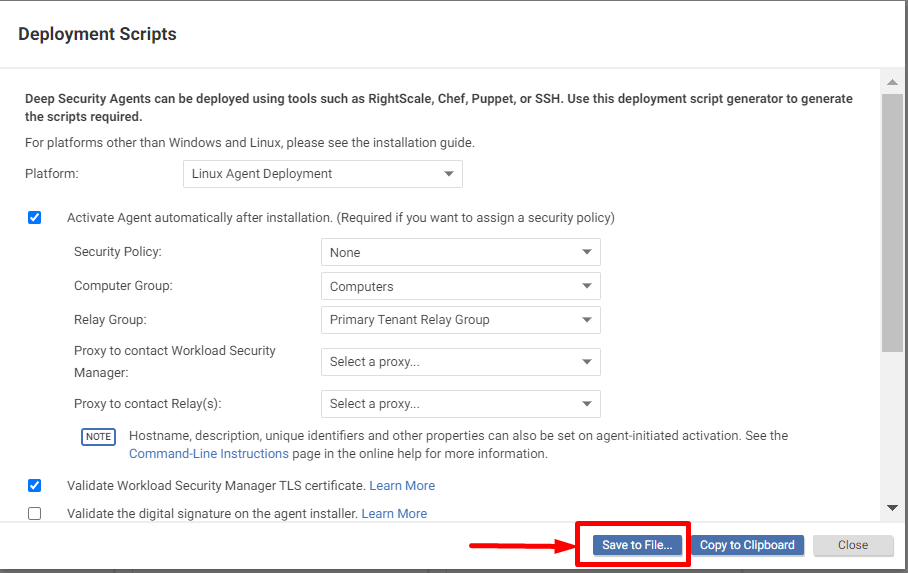
-
For now this guide only cover the deployment for Linux Platforms.
-
-
Save the previous file in compressed file like this: ds_agent_script.tar.gz
-
Upload compressed file created in previous step this file to your AWS S3 Bucket.
-
Configure AWS Elastic Beanstalk extensions
-
For this guide we use EB Cli for Deployment
a. Create the ebextensions folder if not exists
mkdir .ebextentionsb. Create config file inside eb extensions folder
touch ds_agent.config-
You can use any name for file only .config extension is required
c. In the .config file you need to write the next code
sources: /tmp: https://<S3_BUCKET_NAME>/ds_agent_script.tar.gz commands: 00-command: command: /tmp/<DEPLOYMENT_SCRIPT>.sh-
Please replace <S3_BUCKET_NAME> and <DEPLOYMENT_SCRIPT> with your values
d. Save the file
-


-
Update your deployment
eb deploy -
Verify in Cloud One Workload Security/Deep Security as a Service console the agent are activated and you can configure the policy, task, scan, etc.

I leave in this repository and example aplication for you can verify the configuration.
🎉 Thank you for taking the time to contribute! 🎉
Fork this repository.
Commit your code with a message that is structured according to the Conventional Commits specification.
Submit a PR with the information requested in PR template.
git reset --soft HEAD~3 git commit -m "feat: Add some cool stuff" Tip: Backup your branch before you try new things.